
Overview | News | Windows | macOS | Android | iOS | Audio Formats | Components | Encoder Pack | Screenshots | Help & Support | Developer | Old Versions | Other Projects | Blog & Rants
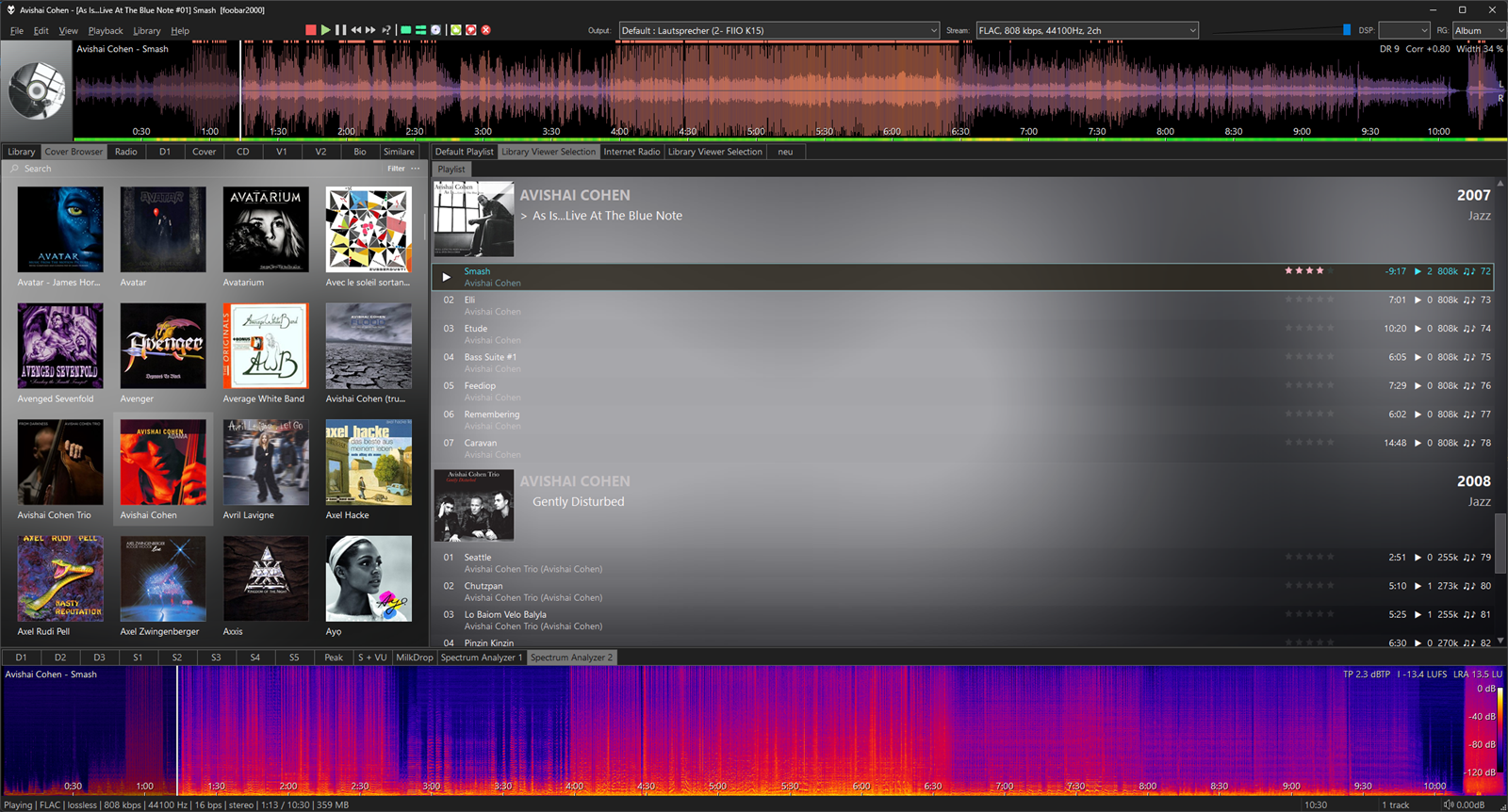
Audio Lens Seekbar
By: Locutus
A seekbar that shows the whole track as a picture you can click – a spectrogram, waveform, live spectrum or loudness map – with standards-compliant measurements on top. No external tools (no ffmpeg), no scripting.
Lenses
Measurements
Features
Installation
Add the panel to your layout: Default UI – category Visualisation; Columns UI – category Visualisations. Right-click the panel for lens, metrics, themes and settings.
Requires foobar2000 2.0 or newer (32 or 64 bit) and Windows 10 or 11. Free, closed source.
Lenses
- Spectrogram – linear or logarithmic, mix / left / right / side / stereo, FFT 1024–16384
- Waveform – peak and RMS envelope, plain or three frequency bands, stereo or mono
- Spectrum bars – live bar spectrum at the playback position, with a waveform timeline
- Loudness heatmap – short-term and momentary loudness (EBU R128)
Measurements
- Up to four curves: local dynamic range, crest factor, PSR, PLR, sample and true peak, RMS, momentary and short-term loudness, stereo width, phase correlation, L/R balance, brightness
- Values: DR (TT DR Offline Meter algorithm, matches foo_dr_meter), integrated loudness, LRA, max. momentary / short-term loudness, sample and true peak, RMS, PLR, crest factor, ReplayGain, correlation, width, balance, bandwidth
- Clipping and true-peak markers, phase correlation strip
- Verified with the EBU Loudness Test Set (Tech 3341 / 3342) and ITU-R BS.2217: all 122 checks pass within the tolerances of the standards
- Multichannel: loudness per ITU-R BS.1770 over all channels (5.1, 7.1, Dolby Atmos channel beds and more)
Features
- Optional quality report: upsampled or resampled files, possible lossy source, fake bit depth, clipping, DC offset, inter-sample peaks, mono compatibility
- Zoom and pan with finer re-analysis of the visible section
- Per-panel settings, 9 built-in presets plus your own, 19 color themes (including C64, Amstrad CPC, NES, Amiga and one from the album art)
- Configurable position marker, transparent background, fullscreen across one or more monitors
- Export the view or an analysis sheet as PNG or to the clipboard
- Analyze tracks into a compressed disk cache from the playlist menu; optional pre-analysis of the next track
- Compatible with the Default User Interface (Default UI) and the Columns User Interface (Columns UI, panel and toolbar)
Installation
Add the panel to your layout: Default UI – category Visualisation; Columns UI – category Visualisations. Right-click the panel for lens, metrics, themes and settings.
Requires foobar2000 2.0 or newer (32 or 64 bit) and Windows 10 or 11. Free, closed source.
Current version: 1.1.0, released on 2026-10-12
Change log:
- Position marker can be configured: width (down to a crisp 1 px line), color, dark outline, smooth or whole-pixel movement
- Transparent background: the panel can show the background of your layout or skin; lens opacity adjustable
- Darkening of the played part can be switched off
- Loudness values are labelled LUFS-I, LUFS-M and LUFS-S
- About 40 % smaller disk cache in a format designed to stay valid; tracks from 1.0 are analyzed once more
- Several panels showing the same track now share one analysis
- Fixed: in Default UI layout editing mode, right-click shows the layout menu again
- Fixed: the quality report badge shows its details even when tooltips are off; findings also go to the console
- Fixed: the loudness heatmap no longer repeats values already shown in the corner
Supported systems: Windows 32-bit, Windows 64-bit.
Works with foobar2000 v2.0 and newer.
Works on Windows 10 and newer.
Links
View version history
Home page
Documentation
Discussion
More components
Browse all
Browse by author: Locutus
Tags: Columns UI panel, Default UI element, Seekbar, visualization